

How to Clean LEGO Sets and Dusty Displays
The real, low-risk way to clean LEGO from dust without stripping the printing, snapping clips, or turning a built model back into a pile of loose bricks.
A finished LEGO set on a shelf is a dust magnet, and once you notice the grey film sitting in every stud gap and window frame, you can't unsee it. The instinct is to grab whatever's under the sink and go at it, and that instinct is exactly how people end up with cloudy clear pieces, faded stickers, or a model that's suddenly missing a windshield panel because it popped off mid-scrub.
Cleaning LEGO from dust is mostly about patience and the right tools, not strong chemicals. Built models are more fragile than loose bricks in a bin: they've got tension holding thin clips together, printed tiles that can't take abrasion, and clear pieces that scratch if you so much as look at them wrong with a paper towel. The goal with any display piece is to get the dust off without ever putting the model itself at real risk.
Below is the approach we'd actually use on a shelf full of built sets, from a quick weekly pass to the deep clean you do once a model's gone properly grey, plus what to avoid entirely.
The short answer
Air and a soft brush handle almost every dust problem a display shelf throws at you, and a barely damp cloth covers the rest. Skip anything wet enough to run, anything abrasive enough to scratch clear plastic, and any cleaner stronger than mild soap, and a built model will hold up fine for years on the shelf.
Start with air, not cloth
Before anything touches the model, get as much dust off with moving air as you can. A rubber-bulb blower (the kind sold for camera lenses) is the best tool on the shelf for this: it's gentle, it reaches into gaps a cloth never will, and it can't scratch anything. A can of compressed air works too, but hold it upright and keep some distance, because tipping a can sideways sprays out cold propellant that can leave a residue on plastic, and a blast held too close can pop a lightweight piece (an antenna, a small printed tile, a loose accessory) right off the model.
Work from the top of the model down, since dust you dislodge higher up will resettle on lower sections anyway. This step alone handles a surprising amount of routine dust, especially on models with lots of flat roof tiles, vehicle hoods, or wide minifigure display bases where dust just sits rather than clinging to anything. It's also the safest possible move on anything with moving parts, since a blower can't jam a hinge or bind up a gear the way a cloth dragged across the same spot can.
Don't skip this step even if you're planning to wipe the model down afterward. Every bit of dust you clear with air is dust you never have to drag a cloth across, and dragging is exactly how fine grit scratches clear plastic and dulls printed tiles. Think of the air pass as protecting the wipe pass, not as a redundant first step.
Brush the spots air can't reach
Once the loose surface dust is gone, a soft brush handles what's left. A clean, dry makeup brush or a soft artist's paintbrush is ideal, small enough to get between studs and soft enough not to scuff printed tiles. An unused, soft-bristled toothbrush works in a pinch, but check the bristles first, since a stiff brush can dull printing over repeated use, and a brush that's already been used for something else can carry oil or grit onto the model without you noticing.
Go stud by stud in detail-heavy areas (grilles, brick-built texture, minifigure accessories) rather than sweeping broadly. It's slower, but it's the difference between actually removing dust and just pushing it into a different gap where it's harder to see and harder to get out later. Brush in one direction rather than scrubbing back and forth, and let gravity help: a light downward stroke tends to carry dust off the model instead of just relocating it.
Minifigures deserve a separate, slower pass. Their printed faces and torsos are some of the most detail-dense surfaces on any set, and a heavy hand here shows up fast as faded features. Hold the figure by the legs or a non-printed limb, brush lightly across the printed surfaces, and don't press. Hair pieces and helmets collect a surprising amount of dust in their inner ridges, and a dry brush is the only tool that reaches them without risking a scratch.
When you need more than dry tools
For grime that's built up over months, not just surface dust, a barely damp microfiber cloth is the next step up, and it's where people most often overdo it. Lightly mist the cloth itself, not the model, wring it out until it's closer to dry than damp, and wipe smooth surfaces gently. Never spray liquid directly onto a built model. It can seep between pieces and sit there, and on stickered sets it can lift the edge of a sticker or leave a water mark underneath that you won't notice until it's dried, sometimes days later once the moisture has had time to work its way under the adhesive.
Plain water is enough for most dust and light grime. If you feel you need soap, a drop of mild dish soap in water is as strong as you should go, and even then only on non-printed, non-stickered bricks. Skip glass cleaner, disinfecting wipes, and anything with alcohol or ammonia. They can cloud clear pieces and dull the printed and painted finish on tiles and minifigures over time, and the damage isn't always obvious right away. A tile can look fine the day you clean it and show a faint haze weeks later once the solvent has fully done its work.
Work in small sections rather than wiping the whole model in one long pass. A small area lets you check your cloth and your pressure as you go, and it means a mistake (a sticker edge starting to lift, a clear piece starting to fog) shows up while you can still stop and change your approach, rather than after you've already gone over the entire model the same way.
Clear pieces and windows need their own care
Clear and transparent pieces (windshields, gems, light bricks) scratch more easily than solid-color bricks, and once they're scratched they stay that way. Dust them with the blower or a very soft brush only, and if a damp wipe is truly necessary, use the softest microfiber you own and the lightest pressure. Skip paper towels and tissue entirely here. Both are abrasive enough to leave fine scratches on clear plastic that show up as a haze under direct light, and the scratching is usually too fine to see until you tilt the piece toward a lamp and suddenly notice a whole network of hairline marks.
If a clear piece already has some haze or fine scratching from being cleaned the wrong way in the past, there's no real fix short of replacing the piece. That's worth knowing before you reach for a rougher cloth out of frustration, because the temptation to scrub harder at a stubborn smudge is exactly how a piece goes from lightly dusty to permanently hazy in one pass.
Large windshield and canopy pieces on vehicle sets are worth extra caution simply because of their size. A bigger clear surface shows scratches more obviously than a small clear stud, and it's also the piece most likely to get an impatient wipe because it's the most visible one on the model. Give it the same light touch you'd give a small piece, not a quicker one because it's bigger.
Cutting the dust problem off before it starts
The single best fix for LEGO dust is a case. A display case or even a simple acrylic dust cover cuts down how often you need to clean a set at all, and it matters most for large, detailed builds where a full clean takes real time. If a case isn't practical for every model on a shelf, prioritize the ones with the most fiddly detail work (foliage builds, models with lots of small brick-built texture) since those take the longest to clean by hand and show dust the fastest.
Placement helps too. A shelf near a window, a heating vent, or a door that gets opened often will collect dust noticeably faster than one tucked in a quieter corner of a room, so if you've got the choice, use that to your advantage. Ceiling fans and forced-air heating vents in particular push a steady stream of dust across whatever's underneath them, so a shelf directly below either one will need attention far more often than one across the room.
A cheap trick that helps more than it should: rotate models occasionally instead of leaving the exact same face pointed outward for years. Dust tends to settle heaviest on upward-facing surfaces, and a model that never moves builds up an uneven layer that's harder to clean once it's had time to really settle in. A model you nudge or turn now and then never lets dust sit undisturbed long enough to become a real chore.
Loose bricks and bins get a different plan
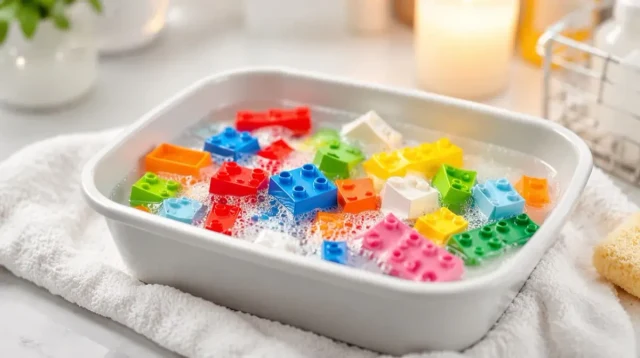
Everything above assumes a finished, built model. Loose bricks in a storage bin are a different job entirely, and a much easier one, since there's no built structure to protect. Plain, unprinted bricks and plates can generally be washed in lukewarm water with a bit of dish soap, swished around by hand or in a mesh laundry bag, and air dried on a towel in a single layer.
The same exceptions still apply: keep anything printed, stickered, or electronic out of the wash pile, and stick to lukewarm water rather than hot, since heat is what actually warps LEGO plastic, not water itself. Sort before you wash, not after, since a piece with a paper sticker looks identical to a plain piece once it's already in the water, and by then the damage is already done.
Drying is the step that trips people up most with loose pieces. Hollow bricks trap water inside the tube, so give a shake before laying pieces out and expect them to need longer than they look like they need. A hair dryer or direct sun speeds things up but risks warping, so plain room-temperature air and a bit of patience is the safer trade every time.
How often to actually clean
Most builders get away with a quick blower pass every few weeks and a proper brush and wipe down every couple of months, though that depends a lot on the room. A bedroom collects less dust than a living room near an entryway, and a set on an open shelf needs far more attention than one behind glass. Watch the model itself rather than the calendar. Once dust is visible in the stud gaps from a normal viewing distance, it's time, and waiting longer just means a slower clean later, since dust that's had months to settle tends to cling more stubbornly than dust that's only a few weeks old.
It helps to think of this less as a chore with a fixed schedule and more as routine shelf maintenance, the same way you'd occasionally dust a bookshelf or a mantel. A minute with a blower now and then keeps a model looking sharp indefinitely, while letting it go for a year turns a quick pass into a genuine project. The sets that end up needing the most work are almost always the ones that got skipped the longest, not the ones in the dustiest rooms.
Common questions
Can I wash LEGO pieces in a dishwasher?
Not built models, and not most pieces in general. Dishwasher heat can warp plastic and cloud clear pieces, and the water pressure can strip printing and stickers. It's sometimes used for large batches of plain, unprinted bricks with no clear pieces, but even then it's a risk, not a recommended method.
Will cleaning wipes damage LEGO minifigures?
Most household cleaning wipes contain alcohol or other solvents that can dull or lift printed detail on a minifigure's face and torso over repeated use. A dry soft brush or a barely damp microfiber cloth is safer for minifigures than any wipe marketed for household surfaces.
Why does my LEGO look cloudy even after cleaning?
Cloudiness on clear pieces is usually fine scratching from past cleaning with something too abrasive (paper towel, a stiff brush, an ammonia-based cleaner), not dust that's still there. Once that haze sets in, gentler cleaning going forward won't reverse it, though it will stop it from getting worse.
Is it safe to take a built model apart to clean it more thoroughly?
It's safe for the pieces, but it's a real time cost and it stresses clips that have already been through one build cycle. For most dust problems, air and a soft brush get you most of the way there without needing to break anything down at all.
Related articles
 Guide
GuideWhere to Watch LEGO Masters (US, Canada, UK, Australia)
A country-by-country guide to legally streaming LEGO Masters US and the Australian spinoff, plus the real story on the UK version and season 6.
 Guide
GuideIs the LEGO Rivendell Worth It? (Honest Take)
Rivendell is 6,181 pieces of elves, waterfalls, and Elrond's council chamber. Here's what actually makes it worth the shelf space, and who should just buy the poster instead.
 Guide
GuideLEGO Masters UK: The Original Show and What Happened to It
The UK version started it all in 2017, ran two series with no cash prize, then quietly stopped. Here's what happened.