

LEGO Pick a Brick Guide: How It Works in 2026
LEGO Pick a Brick lets you buy individual parts instead of whole sets, which is either the most useful corner of LEGO.com or a rabbit hole you weren't ready for. Here's how it actually works.
LEGO Pick a Brick is the part of LEGO.com where you buy pieces one at a time instead of buying a boxed set. No minifigures posed on a cover, no theme branding, just a searchable wall of parts sold by the each, and it's the closest thing LEGO offers to a hardware store for your own collection. If you've ever needed exactly one more 2x4 plate in the right color, or wanted a big bucket of plain bricks to build whatever you want without following instructions, this is where you go.
We get asked about this section more than almost anything else that isn't a specific set, mostly because it isn't obvious how it works until you've used it once. There's no box, no set number, no instruction booklet, and the pricing logic is different enough from a normal set that it trips people up the first time. This guide walks through what Pick a Brick actually is, how the pricing and packing works, what to expect for selection and availability, and where it's genuinely useful versus where a regular set will serve you better.
None of this replaces checking LEGO.com directly for what's in stock right now, since the selection shifts and we can't promise a specific piece will be available the day you read this. What we can do is explain the system underneath it so you know what you're looking at when you get there.
The short answer
Pick a Brick is the right tool for replacing a lost piece, stocking up on basics for free building, or hunting down one specific part in one specific color. It's the wrong tool if you're trying to save money by reconstructing a whole set piece by piece. Check current selection and shipping terms on LEGO.com before you build a project around a part you haven't confirmed is actually in stock.
What Pick a Brick actually is
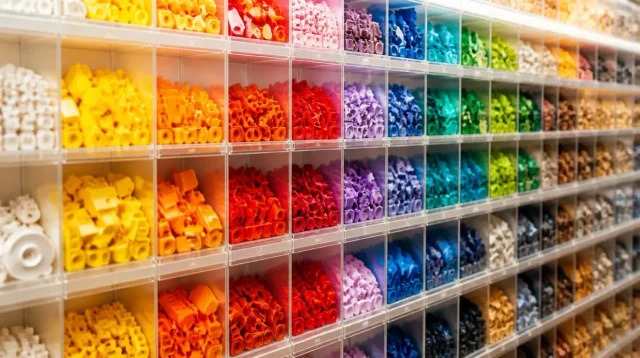
Pick a Brick is a section of the official LEGO online store (and a physical wall inside larger LEGO Certified Stores) where individual parts are sold on their own, priced per piece rather than as a bundled set. You search or browse by part, pick a color if the part comes in more than one, choose a quantity, and add it to your order. There's no story, no packaging art, no age range printed on anything. It's inventory, presented as inventory.
The online version works like any e-commerce catalog: filter by category (plates, tiles, minifigure parts, Technic pieces, and so on), filter by color, and add however many you need. The in-store version in physical LEGO shops is the same idea but tactile, with bins of loose parts and cups or bags you fill and pay for by weight or count depending on the store's setup. Both draw from the same underlying idea, that LEGO's parts are a system, and sometimes you want the system without the set wrapped around it.
Worth knowing up front: Pick a Brick is not the same thing as the Bricks & Pieces customer service line, even though people mix the two up constantly. Bricks & Pieces exists to fix problems with an order or a set (a missing bag, a broken piece straight out of the box), and it's typically framed around what went wrong with something you bought. Pick a Brick has no complaint attached to it at all. You're not reporting an issue, you're just shopping for parts the same way you'd shop for anything else on the site.
Why it exists: the three real use cases
The most common reason people use Pick a Brick is replacement. A part gets lost, a dog eats a piece, a piece cracks after years of being stepped on, and rather than buying a whole new set to get one part back, you order just that part. LEGO's customer service will also replace missing pieces from a set you already own for free in many cases, which is worth trying first if the piece went missing during the actual build, but Pick a Brick is the tool for everything else.
The second use case is building without instructions. Kids and adults who like free building (sometimes called MOCing, for 'my own creation') use Pick a Brick to stock up on plain, useful parts: baseplates, basic bricks in bulk, plates in the sizes that come up again and again. A pile of sets gives you a random assortment shaped by whatever those sets happened to need. Pick a Brick lets you fill in the boring-but-essential parts that sets never give you enough of.
The third is customization and display work. People building custom minifigures, filling out a color scheme a set didn't quite nail, or finishing a large build that needs ten more of one specific plate all lean on Pick a Brick because it's the only place to buy exactly the piece in exactly the color, in exactly the quantity you need, without paying for eleven other things you don't.
How pricing works (and why it feels different from a set)
Set pricing bakes in the license, the box, the instructions, the minifigures, and a bit of a bulk discount for buying a whole model's worth of parts at once. Pick a Brick pricing is per piece, and individual pieces (especially larger or specialty ones like big Technic parts or printed pieces) can look pricier per-unit than what you'd calculate from a set's overall cost. That's expected. You're paying for the flexibility of getting exactly one piece rather than the hundreds that come along with a set, and LEGO doesn't offer the same bulk discount on a single part that it effectively gives you when a whole set's worth of parts ships together.
A simple, common part like a basic brick or plate tends to be cheap, often just a small amount each, and that's where buying in bulk for free building makes the most financial sense. A larger or more specialized part costs more per piece, and this is usually where people feel sticker shock the first time, ordering what looks like a small handful of parts and seeing the total add up faster than expected. It's worth checking your cart total before checkout rather than assuming a bag of parts will be cheap just because each individual piece looks small on the screen.
Selection, colors, and availability
Not every part LEGO has ever made is available through Pick a Brick, and not every part comes in every color. The selection is a rotating subset of LEGO's full parts library, and it shifts over time as pieces go in and out of production or as LEGO decides to feature different parts on the wall. A piece that's currently exclusive to one specific set (especially a newer or licensed one) often isn't available in Pick a Brick yet, and some retired or older parts never make it into the system at all.
Color availability follows a similar logic. A part might exist in a dozen colors across various sets over the years, but Pick a Brick might only carry it in the handful of colors LEGO currently produces in volume. If you're chasing a specific color of a specific part for a display build, search first before you commit to a design around it, because the exact shade or piece you're picturing may simply not be sold loose right now, even if it exists somewhere in a set you already own or could track down secondhand.
Online versus the in-store wall
The online Pick a Brick catalog at LEGO.com is the bigger of the two by a wide margin, since it isn't limited by physical bin space. It's the better option if you know exactly which part numbers and colors you want, and it's the only option if there's no LEGO Certified Store near you.
The in-store wall, found in larger LEGO retail locations, trades selection for immediacy and a bit of fun. You fill a cup or a bag by hand, which is genuinely satisfying if you like sorting through bins, but the selection is whatever that particular store stocks that month, and it changes location to location and season to season. If you're building with a kid, the in-store version tends to be the better afternoon out. If you're hunting a specific part for a specific project, order online instead of hoping a store has it.
Shipping, minimums, and what trips people up
Online Pick a Brick orders typically ship separately from regular set orders and often carry their own minimum order thresholds or shipping costs, so it rarely makes sense to place a Pick a Brick order for just one or two cheap pieces unless you're combining it with a larger order. Check the current shipping terms on LEGO.com before you check out, since they're the kind of detail LEGO adjusts periodically and we'd rather send you to the source than guess at a number that might be out of date by the time you read this.
The other common trip-up is expecting Pick a Brick to behave like a normal LEGO Shop order in terms of speed and packaging. Parts are picked and bagged individually rather than shipped in a factory-sealed box, so processing can take longer than a standard set order, and that's normal, not a sign something went wrong. Build in a little extra time if you need the pieces by a specific date.
One more thing worth planning around: if you're combining a Pick a Brick order with a large or specific project (finishing a MOC, replacing a whole color scheme, restocking for a build session with a group of kids), it helps to make one complete list before you start adding to cart. Going back in to add a forgotten piece later often means a second round of processing and shipping, and that's the kind of thing that turns a simple parts order into a slower, pricier one than it needed to be.
Common questions
Can I use Pick a Brick to replace a missing piece from a set I already own?
Yes, and it's one of the most common reasons people use it. Search for the exact part and color you need and order just that piece. If the piece went missing during the original build (not lost years later), it's also worth trying LEGO's customer service replacement parts request first, since that's often free.
Is Pick a Brick cheaper than buying a whole set for the parts?
It depends on what you need. For a handful of specific parts, Pick a Brick is almost always cheaper than buying an entire set just to get them. For bulk basic parts like plain bricks and plates, it can also be a good value. For rare, large, or specialty pieces, per-piece pricing can feel steep compared to what that piece effectively costs inside a full set.
Why can't I find a specific piece or color in Pick a Brick?
Pick a Brick carries a rotating subset of LEGO's full parts catalog, not everything ever produced. Newer or licensed pieces exclusive to a current set often aren't available loose yet, and some colors or older parts never make it into the system at all. Selection changes over time, so a part that's missing today may show up later, or it may not.
Is the in-store Pick a Brick wall the same as the online one?
No. The in-store wall at larger LEGO Certified Stores is limited to whatever that location currently stocks, which varies by store and season, while the online catalog is broader and more consistent. If you know exactly which part and color you need, ordering online is the more reliable route.
Related articles
 Guide
GuideWhere to Watch LEGO Masters (US, Canada, UK, Australia)
A country-by-country guide to legally streaming LEGO Masters US and the Australian spinoff, plus the real story on the UK version and season 6.
 Guide
GuideIs the LEGO Rivendell Worth It? (Honest Take)
Rivendell is 6,181 pieces of elves, waterfalls, and Elrond's council chamber. Here's what actually makes it worth the shelf space, and who should just buy the poster instead.
 Guide
GuideLEGO Masters UK: The Original Show and What Happened to It
The UK version started it all in 2017, ran two series with no cash prize, then quietly stopped. Here's what happened.